Sherry Wood
Wealthy Affiliate Starter currently comes with 4,000 AI credits to try Ace and the creation tools. The same balance can cover replies, articles, images and other AI work. The useful question is what you want to finish with that allowance. For a first website, I’d put most of it toward one useful article and keep some for the questions you’ll have while editing.
I checked WA’s current pricing and a signed-in credit history on November 14, 2026. The charges I describe below are individual entries observed in that history. Costs vary by task. Use your own Usage history to decide how much a job takes and whether it produces something you’d use.
What 4,000 Starter credits include
According to Wealthy Affiliate’s pricing page, the 4,000 Starter credits are a starting allowance. WA says they do not expire. The paid tiers refresh their included credit allowance each month, including on annual billing, and unused monthly credits expire. Top-ups are a separate purchase. Check the number on your own Credits screen before comparing plans or buying anything.
WA also lists up to 20 Ace messages a day for Starter. Think of credit balance and message limit as two checks. An account can have credits left and still reach the daily message cap. It can also have messages remaining for the day but insufficient credits for more AI work. If you’re planning a short test, leave time to finish your edits manually.
Running out of credits pauses new AI work under WA’s stated policy. The provider says work you’ve already made stays where it is. So if you’re halfway through an edit, you still have the earlier material to work with. Save your final copy and original files separately so you can refer to them, especially if you’re comparing tools or thinking about moving later.
What I could see in Credit Usage history
In the signed-in account, I opened the account menu, chose Credits, then reviewed Usage history. Three existing daily-brief entries showed charges of 29, 36 and 69, and a Learn question showed 367. Daily briefs are usage-history examples. I would check which briefing features are available in your own account before budgeting around them. The Learn example is one observed result, with no repeat on a fresh Starter account.
I also ran one private Writer test using the paid account. I asked for a roughly 900-word draft about labeling herb pots on a windowsill, with plain language and a checklist. Writer displayed an estimate of about 900 credits before the writing step. The ledger recorded 42 credits for the article plan and 540 for the draft, for a total of 582 credits. This is the result from one prompt and one account. I did not repeat it on Starter or ask the image generator for a charge.
| Entry | Credits | What the number tells you |
|---|---|---|
| Daily brief · Oct. 10 | 29 | One prior automated briefing charge. |
| Daily brief · Oct. 14 | 36 | A similar entry came through at a different cost. |
| Daily brief · Oct. 26 | 69 | The largest of the three briefing entries reviewed. |
| Learn question · Oct. 12 | 367 | One recorded answer charge from the Learn area. |
| Private Writer test · Nov. 13 in the ledger | 582 | 42 for the plan and 540 for the draft. |
The useful takeaway from these entries is the variation, even among items with the same label. A reader can use these as examples of what the ledger shows. Your own prompt, its length, what the tool needs to produce and the type of request can change the charge. If you try a task and see two rows, check their names and times before adding them together. A draft followed by a different task can look like one long job from the editor.
What the advertised article estimate means
WA’s current paid-plan examples use roughly 25 articles for 20,000 credits, 50 for 40,000, and 125 for 100,000. The company specifies a roughly 1,400-word article and an average brief. Dividing either of those examples puts the implied planning figure at about 800 credits per article. That’s the arithmetic behind the published example. Your own Writer job can come in above or below it.
If you divide 4,000 by 800, you get five theoretical article-sized jobs under those assumptions. In a real workflow you may send questions to Ace, work through lessons, request a cover image, or ask for changes. Those jobs draw from the same balance. I would use five as a way to understand the math on the pricing page and plan a smaller number of whole pieces.
There’s also a practical quality check. An article-shaped result can still need 30 minutes of editing, more evidence, or a new opening. Look at how much of the output survives the edit. A tight outline that helps you publish a useful post can be a better use of credits than a complete draft you have to replace. The number to track is credits used per usable result, alongside the minutes you spent correcting it.
A 4,000-credit budget for your first website
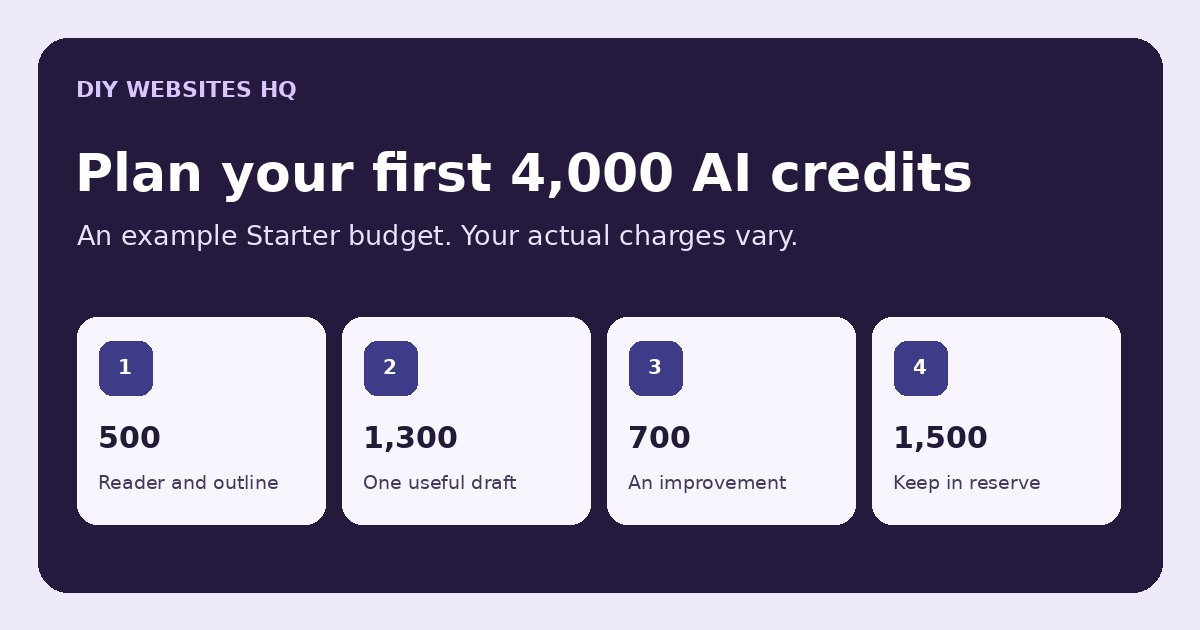
Here’s how I’d allocate the allowance as a planning exercise. These are spending limits I’d set for the experiment. They aren’t published per-task prices. If you use less than one line allows, leave the unused credits for the next useful task.
| Planning allowance | Credits set aside | Result to aim for |
|---|---|---|
| Reader and outline | 500 | A short description of the reader, one clear question, and a useful outline. |
| One draft | 1,300 | A draft you can edit against your sources and examples. |
| One targeted improvement | 700 | A cleaner explanation, one useful table, or an image you’ll actually use. |
| Reserve | 1,500 | Room to learn, handle surprises, and test another task later. |
Start with one narrow reader question
Suppose you’re building a site about growing herbs in small apartments. A precise job could be a guide to labeling three pots when the seedlings look alike. Tell Ace who the reader is, what space and supplies they have, and what the finished page needs to answer. Ask for an outline first if you’re still deciding the approach. Stop once you have enough to start writing.
Feed the Writer the decisions you’ve made. Include your own examples, the labels you’ve tested, and whether the advice applies to indoor or outdoor pots. Tell it what to leave out. For example, give it a three-section structure and ask for a checklist of items a reader can find at home. A brief with clear constraints also makes it easier to see which parts of the draft are worth keeping.
Measure the actual charge
- Record the starting balance and the name of the tool you’re testing.
- Run one task. Note the date, output requested, and any plan or settings that matter.
- Open Usage history and match the new entry to the task and time. Wait for the ledger to update if needed.
- Record the charge and whether you kept the output, used part of it, or discarded it.
- Repeat with the same brief if you need a comparison. Save each result as a separate row.
Use the ledger if there’s other activity on the account. A monthly refill, points reward, or background briefing can change the balance between two screenshots. Subtracting one screenshot from another can give you the wrong charge. Seeing the exact task entry makes it easier to explain your numbers if you later publish a test.
When more credits would help
There’s a useful difference between paying for more creation capacity and solving an editing problem. If most of your generated drafts go unused, a larger plan gives you room to repeat a task that hasn’t helped yet. Try writing the opening yourself and using the tool on a narrow job, such as arranging a comparison table or suggesting questions to cover. Keep the source documents nearby and confirm names, quantities, prices, and any instructions before using the output.
Keep a short record of what worked
A basic log can have six fields: date, tool, requested output, credit charge, editing time, and the part you used. Put a short description in the request field so you can compare two similar jobs later. One row might read “outline for a 900-word herb guide,” followed by the ledger amount and a note that you kept the order of the headings. Another might describe an image prompt and say that you rejected the image because the plant labels were unreadable.
After three or four jobs, look at how often you received something ready to edit. If you published the piece, save its URL in the notes. If you decided against it, write down why so your next prompt can be more specific. You can use the same test on any other writing tool you’re considering. That makes a comparison based on finished work possible even when providers count usage differently.
Look at two or three finished pieces before adding spending. If the test produced one good page and you still have credits left, publish it and see what questions come back from readers. If you’re making worthwhile improvements regularly and keep hitting the allowance, the Wealthy Affiliate plan and price comparison can help you decide between a one-time top-up and a plan change. Compare hosting capacity as well if your goal is more sites.
For a first test, you can start with the free SiteRubix and Starter walkthrough. It shows the signup and setup screens I checked and gives you a first publishing exercise. If you want the bigger picture, read my Wealthy Affiliate review for the tested hosting and recovery examples.
Affiliate disclosure. I may earn a commission if you upgrade through the following link, at no extra cost to you.