Sherry Wood
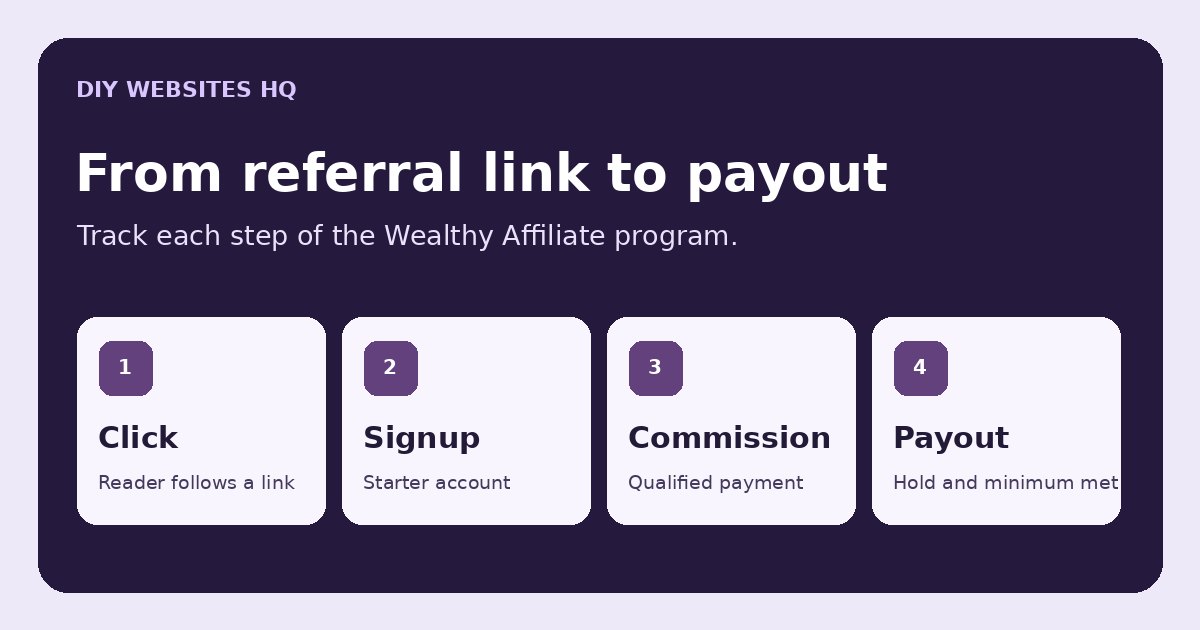
Wealthy Affiliate pays a commission when a person you referred makes a qualifying membership payment. The click, free registration, paid upgrade, commission and payout are separate events. Understanding where each one appears in Earn can save you a lot of guessing about whether your site is bringing in the right readers.
I checked Wealthy Affiliate’s public affiliate page, its terms and the signed-in Earn area on November 14, 2026. The rates and payout rules below are what the current program documentation showed on that date. Account and country details can affect whether and how a payout reaches you.
Affiliate disclosure. I use Wealthy Affiliate and may earn a commission if you upgrade after using one of my referral links.
How the Wealthy Affiliate affiliate program works
The public affiliate program page says members have access to the program when they join. You can find your referral link in Earn. Readers can use the link to start with a free account. A qualifying membership payment from an attributed referral is what creates a commission. Qualifying renewals can generate additional commissions while the referred member keeps paying.
Think of the link as a way for WA to connect a referral to the person who sent it. Your website has a different job. It has to help readers decide whether the free account, a paid plan, or another platform suits them. A page with several referral buttons can still fail that test if it never gives readers enough information to decide.
Here’s a practical example. You publish a guide that helps someone choose a practice address and publish a page. A reader reaches it through Google, reads the setup instructions and follows the Starter link. Your analytics may record that click. WA may then record an attributed free signup. If the reader later chooses a paid plan and the payment qualifies, the commission appears in Earn. Each step answers a different question about what your page is doing.
Current membership commission schedule
The signed-in Earn → How it works page displayed these amounts for qualifying membership payments. Annual figures are commissions on an eligible annual payment. An annual commission enters the applicable hold before it becomes available for payout.
| The referred member pays for | Commission on a monthly payment | Commission on an annual payment |
|---|---|---|
| Builder | $12 | $120 |
| Premium | $20 | $200 |
| Premium Plus+ | $40 | $400 |
In the schedule I reviewed, add-ons and credit top-ups do not earn a commission. If the rates you see differ, use the ones shown in your own Earn account and check whether special offer terms apply. The table describes what a qualifying transaction pays. Your site’s revenue depends on actions readers take after clicking. WA publishes an earnings disclosure explaining that results and earnings are never guaranteed.
When an earned commission can be paid
Earn lists a 30-day hold for monthly membership payments and a 90-day hold for annual membership payments. The hold gives WA time to account for refunds. The terms say a refund reverses the related commission. Look at the available balance and status before you count a pending amount as revenue you can collect.
The signed-in help showed a default payout minimum of $25, with the option to set a higher minimum. WA says payouts run on the first day of each month. A commission can be earned on Starter under the rules I checked, while receiving a payout requires an eligible paid membership. The Earn page describes Dots as the payout provider, with choices that depend on the country. Use the contact address and payout information already associated with your account, and check any instructions in Payouts before relying on a payment date.
Suppose one person on a monthly Premium plan makes an eligible payment that creates a $20 commission. If that’s all you have available, it is below the default $25 minimum. A later eligible payment could bring the balance above the minimum. The hold still applies to each payment and refunds can change the balance. For a revenue log, record the available amount and the payout you actually received in separate columns.
Where to find the numbers in Earn
| Screen | What it helps you answer |
|---|---|
| Links | Which WA referral links you use, how they are labeled, and what link activity is recorded. |
| Referrals | Whether WA attributes registrations to you and which information is available about their status. |
| Payouts | When an eligible amount was paid and where to check payout status or options. |
| How it works | The program’s current published rates, holds and requirements. |
Start by copying your existing referral link from Earn and using a consistent label or tracking ID for the page you plan to measure where supported. Use a short name that still gives you context later. If your free setup guide and your hosting comparison both use the same destination, give those placements distinct tracking labels when your tools support it. That way you can tell which question brought the reader closest to signing up.
On the website side, set up an outbound-click report in GA4. Capture the page and link destination or the label you assigned. Then compare its date range with the WA report. Website clicks and WA clicks may differ because of tracking consent, reporting rules, attribution and time zones. A gap between the numbers alone does not tell you which system is wrong. Use my affiliate click tracking walkthrough to set up a reproducible check.
Use the funnel to decide what to fix
If people see the page in search but rarely open it, check whether the title describes the question they searched. In Search Console, look at the actual queries and the page they lead to. If they search for help using a free website, a title focused on commissions may miss the need. Give that reader a guide to one thing they can do today.
If people read the page and rarely follow the link, see whether they’ve reached a natural point to try the service. After a walkthrough, a button to try the specific feature makes sense. A pricing article can give a reader the free option after comparing costs. Keep the disclosure near the recommendation. The FTC’s endorsement guidance explains why readers need to understand an affiliate relationship when they see the recommendation.
If clicks show up but free registrations are scarce, open the destination and look at what it asks the reader to do. Verify that the link points to the page you described. Make sure a mobile user can reach it and that your disclosure and button text are visible. Keep results for real audience activity separate from verifying that your own button opens the intended destination. The program terms address self-referrals.
If you see registrations and few upgrades, look at how clearly your content explains the point at which paid features matter. Someone with one practice site may have no reason to buy right now. Show the decision in your membership pricing guide or tell readers where to check whether they actually need more hosting or creation capacity.
Give your first referral page one job
A useful first report can fit into a small table with one row per page. Start with the date range, page address, search impressions, organic clicks, and recorded outbound visits to your referral link. Add the number of attributed signups only if WA’s report lets you tie them back to that placement. Keep paid upgrades and payouts in separate columns. If a number is only available for the whole account, label it as account-wide and leave the page-level cell blank. That is more useful than assigning all activity to whichever page you edited last.
When you compare two pages, compare their roles first. A referral program explanation may get readers who already have an account and are looking for payout rules. A free setup guide may get readers who have yet to register. Add an affiliate link where it answers the next question a reader actually has. A person looking for the payout screen can go straight to the account interface, while a beginner reading about the practice site can decide whether they want to start one.
Use week-to-week reporting to learn what to improve. A result based on one visit can change dramatically with the next visitor. Write down when you changed a heading, image, link, or button so you can compare the right period. If there’s a legitimate paid referral later, treat it as one observed outcome, then track whether subsequent referrals keep paying before estimating recurring revenue.
Pick one question from your audience that your own experience can help answer. Publish the answer with an example, show a step they can reproduce, and give them one sensible next action. Track that placement and wait for enough real visits to make comparisons useful. Start with the reader experience before changing multiple links, buttons, or headlines all at once, so you can tell which change mattered.
If you want to see the process from a reader’s side, follow my free SiteRubix walkthrough. If you want context about the platform and its limitations, read my hands-on Wealthy Affiliate review before deciding whether you want to recommend it.
Affiliate disclosure. I may earn a commission if you upgrade through the following link, at no extra cost to you.